
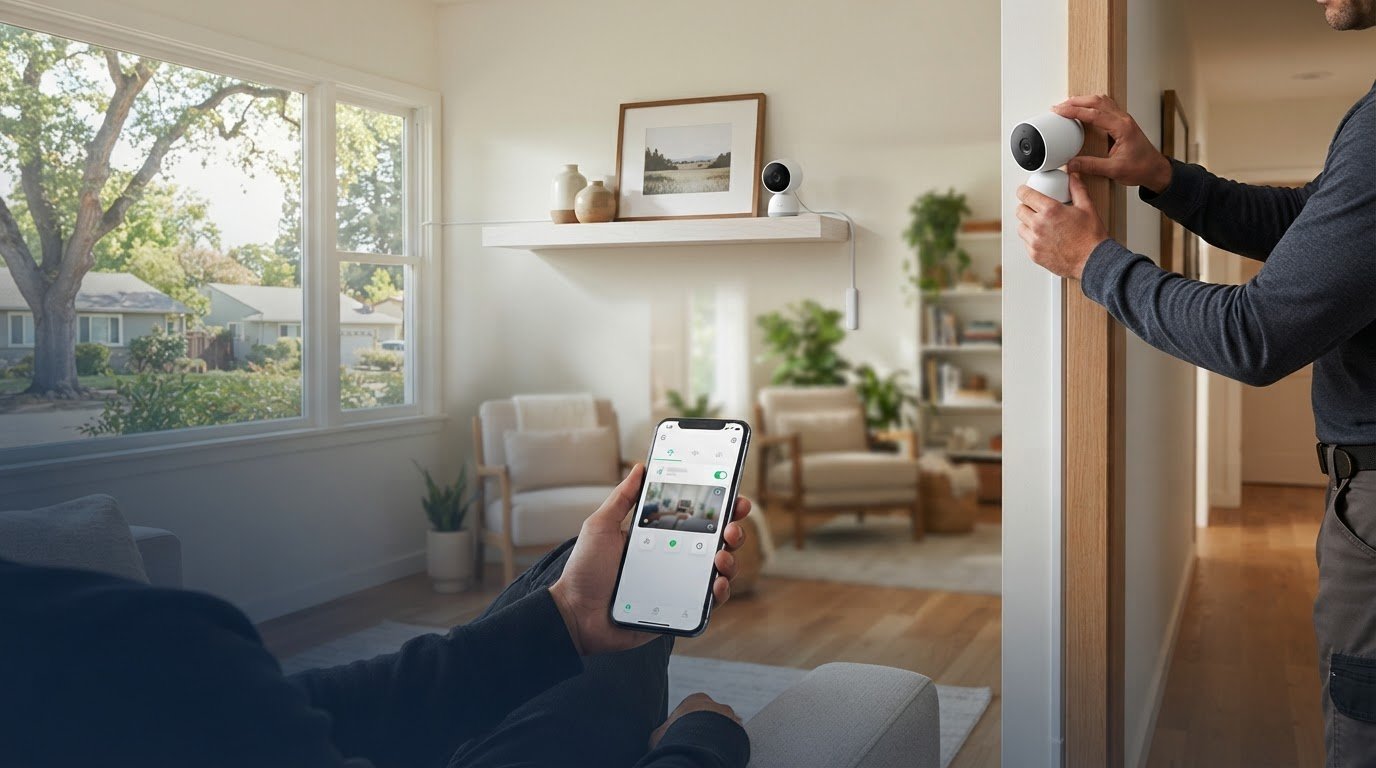
The cheapest indoor camera setup isn’t always the most affordable one. A camera that misses key areas, sends distracting motion alerts, or leaves visible wiring may not deliver the coverage you need. Choosing indoor security camera installation means considering more than the camera itself: placement, recording options, app access, and setup all affect how useful the system is day to day.
It’s reasonable to want reliable remote viewing without a complicated setup or unnecessary features. A DIY camera may work well if you’re comfortable positioning it and configuring its app. Professional installation can be a better fit if you want help planning coverage and discussing mounting and cable routes.
This guide compares indoor camera approaches and explains which features matter in real use, including resolution, motion alerts, recording, and mobile app access. You’ll also learn what to consider when choosing placement and deciding between DIY setup and a local installer. For homeowners and businesses in Sacramento, Roseville, Rocklin, Folsom, Antelope, Elk Grove, Rancho Cordova, Natomas, and West Sacramento, the goal is a dependable setup that fits your property and budget.
Key Takeaways
- Affordable indoor security camera installation starts with matching camera coverage and recording needs to your rooms, not simply choosing the lowest-cost option.
- Compare image clarity, field of view, mobile app access, motion alerts, and recording options based on how you plan to monitor the space.
- Weigh DIY wireless, professionally installed wireless, wired or PoE, and integrated systems by setup effort, wiring, connectivity, and recording approach.
- Plan camera positions around monitoring goals, power, and connectivity to reduce blind spots while avoiding unnecessary views into private areas.
- For properties in Sacramento, Roseville, Rocklin, Folsom, Antelope, Elk Grove, Rancho Cordova, Natomas, and West Sacramento, professional installation can help you plan mounting, cable routes, and system setup.
What Makes an Indoor Security Camera Installation Affordable and Useful?
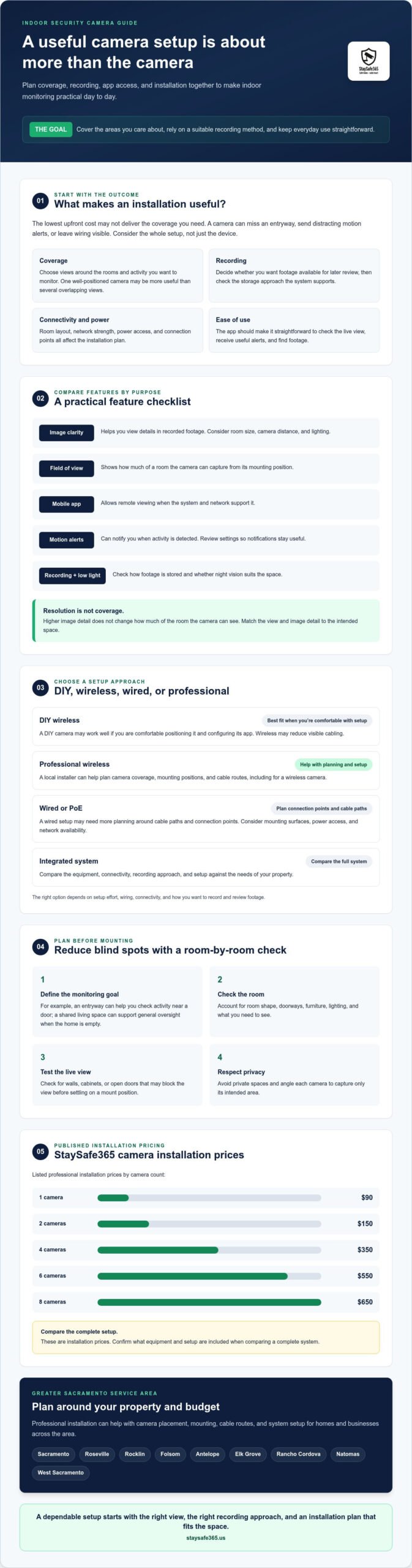
An affordable indoor security camera installation isn’t simply the option with the lowest upfront spend. It’s a setup that covers the areas you care about, works reliably with your home’s connectivity, and makes footage practical to review. A camera can offer high resolution, but that won’t help much if its view misses an entryway or the recording method doesn’t suit your needs.
Start by separating two decisions: which camera and recording features fit the property, and how the equipment should be installed. Room layout, camera count, mounting positions, power access, network strength, and recording preferences all shape the plan. Understanding the basics of Closed-circuit television (CCTV) can also help clarify how cameras support monitoring and recorded video.
Which indoor spaces may benefit from camera coverage?
Choose locations according to a clear monitoring goal. An entryway may help you check activity near a door, while a shared living space may be useful for general oversight when the home is empty. The right view depends on room shape, doorways, furniture, lighting, and what you need to see. One well-positioned camera may be more useful than several aimed at overlapping areas.
Avoid private spaces, and angle each camera to capture only its intended area. Check the live view before settling on a mount position, since a wall, cabinet, or open door can block the view. For more planning guidance, see this guide to home security camera placement.
What should affordability mean beyond the camera itself?
Consider the effort required to install and maintain the setup, along with how you’ll view alerts and recordings. A camera’s app should be clear enough for you to check the live view and find footage without a frustrating process. Recording needs matter too: decide whether you want recordings available for later review, and confirm what storage approach the system supports.
Installation complexity can change with the mounting surface, cable route, power access, and network availability. A wireless camera may reduce visible cabling, while a wired setup may require more planning around cable paths and connection points. If you may add cameras later, check whether the recording and connectivity approach can accommodate that plan before choosing equipment.
StaySafe365 lists professional installation pricing by camera count: $90 for one camera, $150 for two, $350 for four, $550 for six, and $650 for eight. These are installation prices, so ask what equipment and setup are included when comparing a complete system.
In short, an affordable indoor camera setup is one that provides the coverage you need, operates dependably, and stays straightforward to use. For Greater Sacramento homes and businesses, professional installation can help you plan placement and cable routes around the property’s layout.
Which Indoor Camera Features Are Worth Comparing Before Installation?
Choose features according to what you need to see and how you’ll review activity. A useful indoor security camera installation pairs a camera’s capabilities with its intended room, reliable connectivity, and a recording method you can manage. No single specification guarantees effective coverage, so compare the full setup rather than focusing on a headline feature.
Use this checklist to connect each feature with its practical purpose:
- Image clarity: Helps you view details in recorded footage. Consider the room size, camera distance, and lighting.
- Field of view: Shows how much of a room the camera can capture from its mounting position.
- Mobile app access: Lets you check the camera’s view remotely, provided the system and network support it.
- Motion alerts: Can notify you when activity is detected. Review alert settings to keep notifications useful.
- Recording and night vision: Check how footage is stored and whether low-light viewing suits the space.
Does 4K resolution matter for an indoor camera?
Resolution affects image detail, not the amount of a room a camera can see. A 4K camera may be worth considering for a larger room or a view where finer detail matters, but placement, distance, lighting, and field of view also shape the footage you’ll get. Before choosing equipment, verify that the specific camera supports 4K resolution.
For Sacramento homes and businesses, match the camera’s view to the room instead of assuming higher resolution solves every coverage issue. A carefully positioned camera with a suitable field of view may serve your monitoring goal better than a higher-resolution camera pointed at the wrong area.
How do app alerts, AI detection, and recording work together?
Remote app viewing helps you check activity while away, while alerts can draw your attention to detected motion. AI motion detection may distinguish between types of activity, but only if the selected system supports it. Treat it as a filtering aid, not a guarantee that every event will be classified correctly. Night vision and NVR support also vary by system, so confirm those features before choosing.
An NVR, or network video recorder, is one possible recording approach. Don’t assume it’s included or compatible with every camera. Compare the system’s confirmed recording options, storage capacity, and app access, then check whether configuration is part of the installation. The Federal Trade Commission also offers practical advice on how to secure your home security cameras, including reviewing security settings before relying on remote access.
If you want help matching camera features to your property, consider local security camera installation guidance before finalizing your setup.
Affordable Indoor Camera Options: DIY, Wireless, PoE, or Professional Installation?
The right option depends on your comfort with setup, the room’s connectivity, and how discreetly you want cables routed. Wireless describes how a camera connects to a network, but it still needs power. Wired and PoE setups involve cable planning, and the available recording features depend on the selected system. Compare the whole setup, not just the camera type.
| Option | Setup and wiring | Connectivity and recording | May suit |
|---|---|---|---|
| DIY wireless | You handle positioning, power, app setup, and testing. Visible power cords may remain. | Usually relies on Wi-Fi; confirm the system’s recording options and any storage requirements. | People comfortable configuring a camera for a straightforward room. |
| Professionally installed wireless | An installer handles mounting and can discuss a neater cable route, though the camera still needs power. | Check Wi-Fi coverage, app access, and the specific system’s recording method. | People who want hands-on setup support without assuming a wired connection. |
| Wired or PoE | Requires cable routing and planning around mounting locations. PoE uses a network cable for power and data when supported. | May use a wired network connection; NVR recording is an option only when supported by the chosen system. | People seeking a coordinated wired setup and prepared to plan cable paths. |
| Integrated system | Setup depends on how the cameras and recording equipment connect. Installation may require coordinating several components. | App access, connectivity, and recording vary by system, so verify compatibility and included features. | Homes or businesses comparing a connected system rather than standalone cameras. |
When might a DIY wireless indoor camera be enough?
A DIY camera may fit a simple room if you’re comfortable choosing a position, connecting it to Wi-Fi, and configuring its app. Check the signal where the camera will sit, confirm that a suitable power outlet is nearby, and test live viewing and alerts after setup. Wireless can reduce data-cable routing, but it doesn’t remove the need to plan for power or reliable connectivity.
When should you compare wired or professionally installed options?
Wired or PoE cameras can make sense when you want a more coordinated installation or need to plan around network and recording equipment. Cable routes and mounting surfaces affect the work, so consider how to keep wiring tidy before choosing positions. For details on wired setups, read this PoE camera installation guide.
Professional installation is another choice if you’d rather have mounting and cable routing handled for you. StaySafe365 provides security camera installation for homes and businesses across Greater Sacramento, including Sacramento, Roseville, Rocklin, Folsom, Antelope, Elk Grove, Rancho Cordova, Natomas, and West Sacramento. For an indoor security camera installation, compare the proposed placement, cable plan, app access, and confirmed recording features before deciding which approach fits.
How to Plan Indoor Camera Placement and Installation
A useful indoor camera plan starts with the reason you want coverage, then works through the room, power, network, and mounting details. This order helps you choose positions that serve a clear purpose instead of adding cameras wherever a surface is available. For broader planning across cameras and other security equipment, see this home security systems guide.
- Define the goal: Decide what activity or area you want to monitor.
- Map the view: Identify rooms and routes that support that goal, and note possible obstructions.
- Check connections: Confirm power access and reliable Wi-Fi at each proposed location. For wired equipment, identify possible cable routes.
- Choose and test positions: Mount cameras where they can capture the intended view, then check the image through the app and adjust the framing if needed.
How do you choose indoor camera positions?
Prioritize the rooms and entry routes that match your monitoring goals. For example, a camera near an interior entry route may show movement through that area, while a shared room may offer a broader view of everyday activity. Avoid pointing cameras toward private areas or capturing more of the home than necessary.
Windows can create backlighting that makes the camera view less useful, especially when bright outdoor light sits behind the activity you want to see. Test the live view at different times of day if lighting changes. After mounting, open the app and check the framing from the same view you’ll use remotely. Adjust the angle if furniture, doorways, or glare obstruct the area.
What should you check before installation day?
Walk through each proposed camera location and check the practical details before selecting equipment. A wireless camera still needs power and a dependable Wi-Fi connection. Wired equipment needs a suitable mounting surface and a planned cable route. Note where cables might remain visible and discuss routing preferences with the installer.
- Confirm power access and network coverage at each planned position.
- Identify walls, ceilings, or other mounting surfaces and any likely obstructions.
- For wired setups, review cable paths and how to keep the installation neat.
- Ask what app configuration and system testing the installation includes.
These checks help set clear expectations for an indoor security camera installation. StaySafe365 provides professional camera installation across Greater Sacramento, including Sacramento, Roseville, Rocklin, Folsom, Antelope, Elk Grove, Rancho Cordova, Natomas, and West Sacramento. Request a security camera installation quote to discuss placement and installation options for your property.
Choosing Indoor Security Camera Installation in Greater Sacramento
A local installer can help turn camera decisions into a working setup. Professional mounting, planned cable routing, and system checks can reduce uncertainty about camera views and connections. Before choosing a provider, ask what equipment and installation steps are included, and make sure the proposed plan addresses your property’s layout and monitoring goals.
For an indoor security camera installation, look for clear answers about what the selected system actually supports. Resolution, motion detection, recording options, and app features can vary by camera and system. Confirming those details helps you understand what you’ll be able to view and how you’ll access recorded footage.
What should you ask a local installer before choosing?
Use these questions to clarify the work before you commit:
- Which camera capabilities and recording options does the proposed system include?
- How will the cameras connect, and what app features are available for remote viewing?
- How will visible wiring be handled, and what setup or system testing is included?
- Can the installer explain the plan in a language you’re comfortable with?
Ask for a clear explanation of the camera positions and cable routes, too. Thoughtful routing can help keep wires and conduits from becoming a distracting feature of the room. If mobile app integration matters to you, confirm whether app configuration is included in the installation rather than assuming it is.
How can StaySafe365 help with indoor camera installation?
StaySafe365 supplies and professionally installs security camera systems for homes and businesses across Greater Sacramento. Service areas include Sacramento, Roseville, Rocklin, Folsom, Antelope, Elk Grove, Rancho Cordova, Natomas, and West Sacramento. Its range of security equipment includes high-definition cameras, alarm systems, and integrated smart security technology.
Before work begins, discuss your preferred coverage areas, mounting locations, cable routing, and the system features you need. That conversation can help align the installation plan with your property, whether you’re monitoring a home or a business space. Confirm the specific camera capabilities and what configuration or testing the selected installation includes. StaySafe365’s listed installation prices are $90 for one camera, $150 for two, $350 for four, $550 for six, and $650 for eight. Ask which equipment and setup are included in the price for your project.
For local help planning camera placement and installation, request a security project quote from StaySafe365.
Put Your Indoor Camera Plan Into Action
A dependable indoor camera setup starts with the right fit: coverage matched to your rooms, features suited to your monitoring needs, and an installation approach you can use confidently. Compare image clarity, app access, alerts, and recording options, then check camera placement, power, and connectivity before settling on a system.
Professional indoor security camera installation can help reduce uncertainty around mounting, cable routing, and system setup. StaySafe365 installs security cameras for homes and businesses across Greater Sacramento, including Sacramento, Roseville, Rocklin, Folsom, Antelope, Elk Grove, Rancho Cordova, Natomas, and West Sacramento. The company also offers alarm systems and integrated smart security technology. Ask which features and configuration are part of the installation you’re considering.
If you’re ready to discuss camera coverage and installation pricing for your property, request a security project quote from StaySafe365.
Frequently Asked Questions
What is the most affordable way to install an indoor security camera?
A straightforward DIY setup may be a good fit if you’re comfortable mounting a camera, connecting it to your network, and configuring its app. But affordability isn’t just about avoiding installation help. Consider whether the camera covers the intended area, whether you can access recordings, and whether the system works reliably in that room. Compare the full setup and effort required before deciding which option offers practical value. If you’re comparing professional installation, StaySafe365 lists tiered prices from $90 for one camera to $650 for eight. Confirm what equipment and setup are included.
Are wireless indoor security cameras easier to install than wired cameras?
Wireless cameras can be simpler to position because they don’t need a data cable routed to the network. They still need power, reliable Wi-Fi, and app configuration. Wired cameras require more planning for mounting and cable routes, but may suit a coordinated installation. Neither option is automatically easier for every room. Consider outlet locations, network access, cable visibility, and whether you want to handle setup yourself.
Do indoor security cameras need Wi-Fi to work?
It depends on the camera and the features you want to use. Some cameras rely on Wi-Fi for app access, remote viewing, or alerts, while a system with local recording may handle recording differently. Check the specific system’s requirements before choosing it. If you want to view activity while away, confirm what internet connection and network access the camera needs for remote features to work.
Is 4K resolution worth considering for an indoor security camera?
4K may be useful when you want more image detail, such as in a larger room where the camera is positioned to cover a broad area. It doesn’t guarantee better overall coverage or clear footage in every condition. Camera placement, distance, lighting, and field of view also matter. Confirm that the specific camera supports 4K, then compare its view and performance with your monitoring needs.
Can indoor security cameras send motion alerts to a phone?
Yes, some camera systems can send motion alerts through a mobile app. The camera, app, network connection, and notification settings must support the feature. Some systems may also offer AI motion detection, but availability and performance vary. Check which alerts the selected camera provides and adjust settings to make notifications useful. Remote viewing and alerts can help you check activity while you’re away from home.
When should I hire a professional for indoor security camera installation?
Consider professional indoor security camera installation if you want help choosing mounting positions, planning cable routes, connecting system components, or testing the setup. It can also be useful when wiring would be difficult to conceal or when you’re coordinating several cameras. Before selecting an installer, ask which camera features, recording options, app setup, and system testing are included, so the scope is clear.
Does StaySafe365 install indoor security cameras in Sacramento and nearby cities?
Yes. StaySafe365 supplies and professionally installs security camera systems for homes and businesses in Greater Sacramento. Coverage includes Sacramento, Roseville, Rocklin, Folsom, Antelope, Elk Grove, Rancho Cordova, Natomas, and West Sacramento. The company also offers alarm systems and integrated smart security technology. To discuss camera needs and installation pricing for your property, request a security project quote.
Leave a Reply