
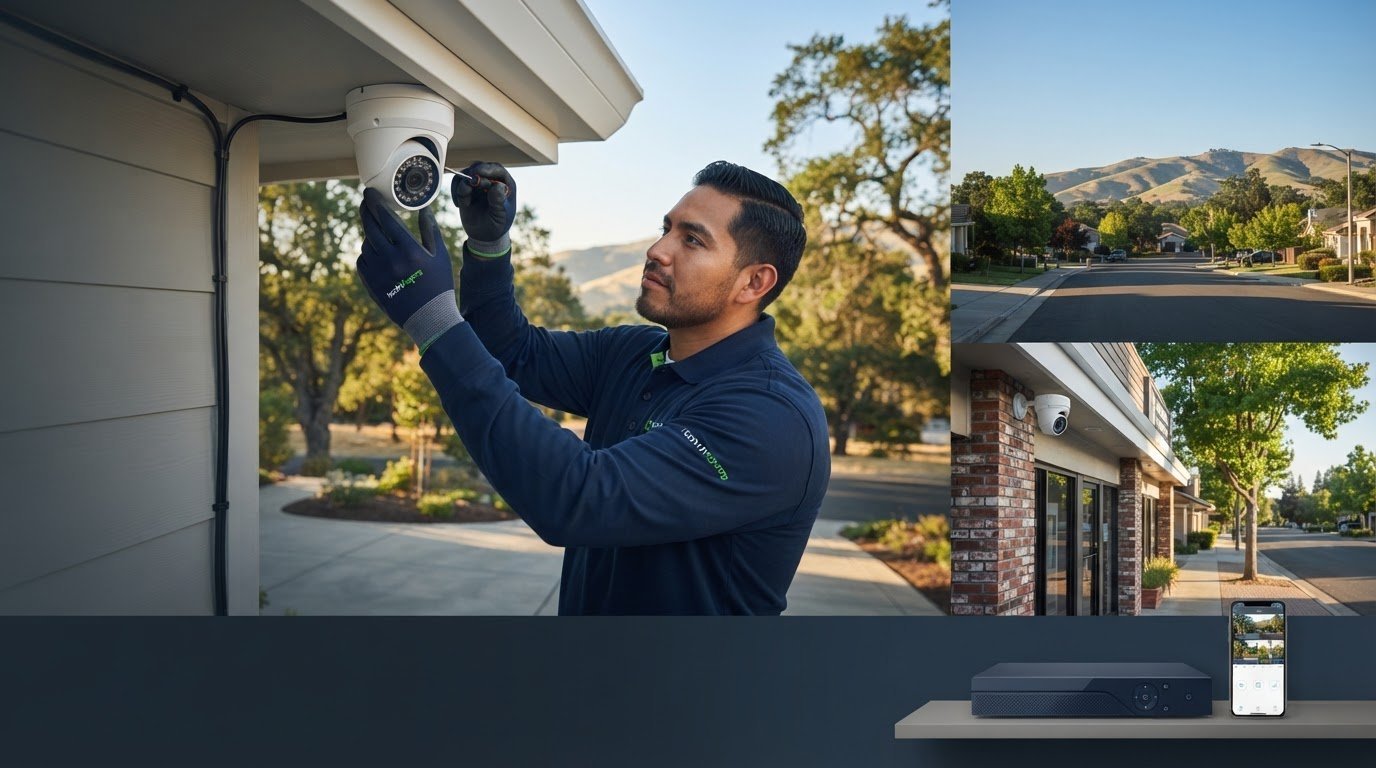
What good is a security camera if it misses the entrance, captures unclear footage, or sends alerts you can’t use? A professional camera installer Rocklin homeowners and businesses can rely on should plan for the property, not just mount cameras. Camera placement, image detail, recording, and a tidy installation all matter.
It’s reasonable to have questions about camera locations, visible wiring, and whether the app will be easy to use. A practical setup helps you monitor the areas that matter without adding unnecessary complexity. This guide explains how to assess coverage, compare camera features, and decide what installation approach suits your property.
You’ll learn what 4K resolution can show, how PoE cameras and an NVR work together, and why camera placement affects what you see on your phone. We’ll also cover motion alerts and how residential and commercial needs shape a system. Whether you’re securing a Rocklin home, storefront, or business property, the goal is useful coverage, clear footage, and a clean installation tailored to your space.
Key Takeaways
- Map entrances, driveways, delivery areas, and work zones before deciding where cameras should go.
- Understand how resolution, PoE cabling, NVR recording, and mobile access affect everyday monitoring.
- Compare wired and wireless approaches by considering the building layout, cable routes, and system needs.
- A professional camera installer Rocklin property owners choose should tailor camera placement and configuration to the site.
- Ask for discreet cable routing and a clear app walkthrough so the finished system is easy to use.
Choosing a Professional Camera Installer in Rocklin: Start With Your Property
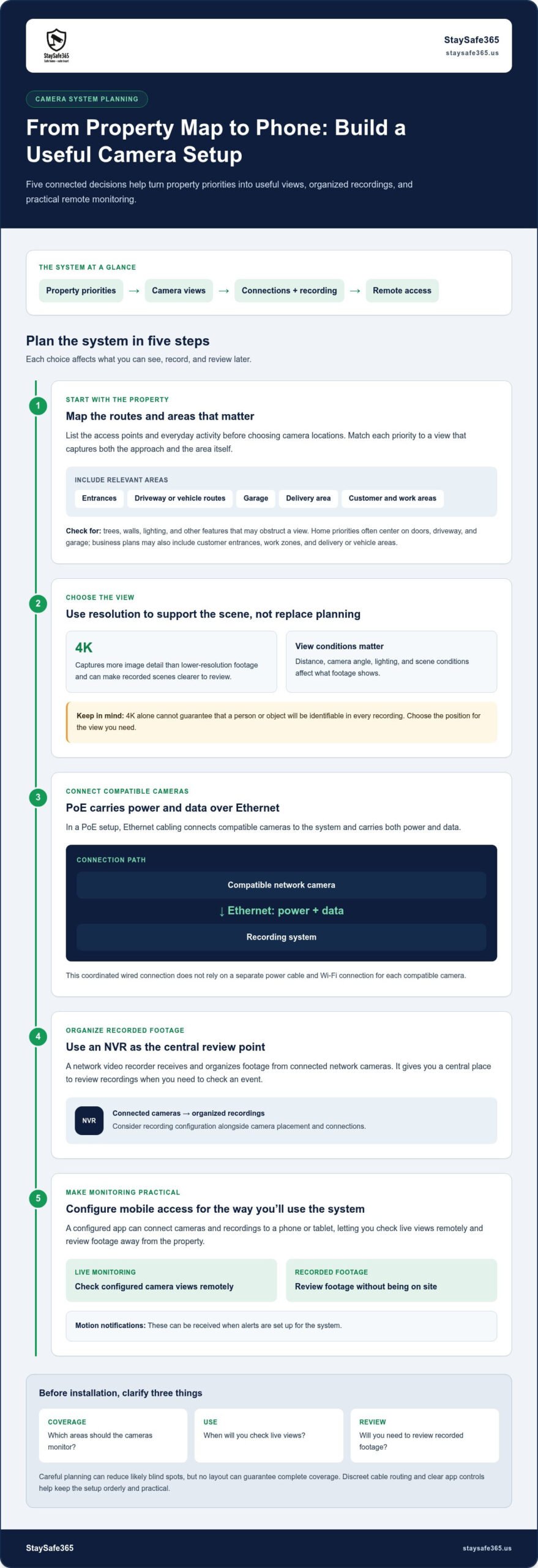
For Rocklin homeowners and business operators, a useful camera system starts with the property’s access points and daily activity. Consider the front and side entrances, driveway, garage, delivery area, and places where people work or customers arrive. These details help determine which views matter and where the layout may leave gaps.
A professional camera installer Rocklin property owners can rely on should plan around those everyday movements, not simply use convenient mounting points. Consider what each camera needs to capture, the approach to the area, and how footage will be reviewed. An IP camera sends video over a network, so placement, connections, and recording configuration should be considered together. No layout can guarantee complete coverage, but careful planning can reduce likely blind spots.
What should a Rocklin camera installation cover?
Start by listing the routes people and vehicles use to enter and move around the property. For a home, note the front and side doors, garage, driveway, and delivery drop-off area. For a business, add customer entrances, work areas, and places where vehicles or deliveries arrive. Think about which views you need during quieter hours, too.
Then match each priority to a useful camera view. A camera intended to monitor a side entrance should capture the approach as well as the doorway. Check whether trees, walls, lighting, or other features could obstruct the view. This simple site map gives the installation a clear purpose and helps identify potential gaps before work begins.
How do home and business camera needs differ?
At home, priorities often include entryways, the driveway, and activity around the garage, with convenient mobile access for checking views remotely. A business may need views of customer entrances, selected customer areas, and work zones to support routine oversight. Property managers may also need a plan that accounts for shared entrances and other relevant access points. StaySafe365 tailors camera placement and configuration for homes and businesses in Rocklin and nearby Greater Sacramento communities.
Those priorities affect camera locations and how people use the system. A home setup should make frequently used views easy to access. A commercial system should focus on areas relevant to daily operations and make footage straightforward to review. In both cases, discreet cable routing and clear controls help keep the installation neat and practical.
Before installation, write down the areas you want to monitor, when you expect to check them, and whether you need to review recorded footage. Those decisions give the project a clear direction: useful coverage, orderly wiring, and monitoring that fits the property.
Compare Camera Features That Matter: 4K, PoE, NVR, and Mobile Access
Camera specifications are easier to compare when you connect them to how you’ll use the system. Resolution affects image detail, PoE describes how compatible cameras receive power and send data, an NVR organizes recordings, and a mobile app lets you check configured cameras remotely. A professional camera installer Rocklin property owners choose can plan these elements around the areas they want to monitor.
| Feature | What it does | Practical benefit |
|---|---|---|
| 4K resolution | Captures video with more image detail than lower-resolution footage. | Can make recorded scenes clearer to review, depending on camera placement, lighting, and viewing conditions. |
| PoE cabling | Uses Ethernet cabling to carry power and data between compatible cameras and the system. | Provides a coordinated wired connection without relying on each camera’s separate power cable and Wi-Fi connection. |
| NVR recording | Organizes and stores footage from connected network cameras. | Gives you a central place to review recordings when you need to check an event. |
| Mobile app access | Connects configured cameras and recordings to a phone or tablet. | Lets you check live views remotely and review footage without being at the property. |
What does 4K resolution mean for security footage?
More resolution means more image detail in the recorded scene. That can be useful when reviewing activity near an entrance or driveway, but 4K alone can’t guarantee that a person or object will be identifiable in every recording. Distance from the camera, its angle, lighting, and conditions in the scene all affect the result. Choose camera positions for the view you need, not just the highest resolution available.
How do PoE, NVR, and mobile apps work together?
In a PoE setup, Ethernet cabling links compatible cameras to the recording system and carries both power and data. The NVR receives and organizes camera footage, giving you a central place to review recorded activity. With mobile app access configured, you can check live views remotely, review recordings, and receive motion notifications when those alerts are set up for the system.
Good planning connects equipment choices to the site and the way people will use the system. The physical security planning guidance from CISA provides a broader framework for thinking about security resources. For Rocklin homes and businesses, professional installation can bring camera connections, recording, and mobile access into one practical setup. Explore professional camera installation to see how the system can be configured for your property.
Compare Installation Approaches for Rocklin Homes and Businesses
The right installation approach depends on the building, camera locations, and how you plan to use recorded footage. A wired PoE system connects compatible cameras to the recording system with Ethernet cabling that carries power and data. It can suit a coordinated camera-and-recorder setup, but cable routes need planning. A wireless approach can reduce the need for network cabling to each camera, while its suitability depends on the property and project requirements. Neither approach replaces thoughtful camera placement.
Choose the camera count based on the views the site needs, not a standard formula. A home with several access points has different priorities from a business with customer areas and work zones. A professional camera installer Rocklin residents and businesses work with can tailor camera positions, connections, and system configuration to the layout. ONVIF also emphasizes that camera placement is key to making a system useful.
| Property type | Planning priorities | Installation considerations |
|---|---|---|
| Home | Entrances, garage, driveway, and convenient app access. | Plan camera views around household access points and route wiring discreetly. |
| Commercial property | Building access, customer areas, operational visibility, and footage review. | Coordinate camera positions and recording around the site’s activities and layout. |
| Shared-use property | Shared entrances, common access points, and clear monitoring responsibilities. | Map relevant views and configure the system for the property’s shared spaces. |
When is a professionally configured PoE system a practical choice?
PoE can be a practical fit when the plan calls for several compatible cameras connected to a central recorder. Cable routes can be planned to suit the building and keep wiring discreet, rather than leaving exposed runs across finished areas. The number and position of cameras still depend on the views the property needs. For a fuller walkthrough, read PoE Camera Installation: The Ultimate 2026 Guide to Professional Surveillance.
Which priorities change between a home and a business?
For a home, the plan may focus on entryways, a garage, and app access for checking views remotely. A business may need to monitor multiple access points, maintain visibility into selected operational areas, and review recordings when needed. A shared-use property adds common entrances to the plan. StaySafe365 tailors installation and configuration to each site, with discreet wiring and camera placement shaped by the property rather than a fixed layout.
What to Expect From a Professional Camera Installation in Rocklin
A well-organized installation moves from understanding the site to showing you how to use the finished system. StaySafe365 tailors camera positions and system configuration to each Rocklin home or business, focusing on useful views, discreet wiring, and straightforward access to footage.
- Understand the site: Review the property layout, access points, and your monitoring priorities.
- Plan coverage: Select camera positions and cable routes that support the views you need.
- Install equipment: Mount cameras and route wiring neatly for a tidy finish.
- Configure the system: Connect cameras to the NVR and set up relevant system features.
- Demonstrate use: Configure mobile access and walk you through viewing cameras and recordings.
How does installation planning reduce coverage gaps?
Planning connects each camera position to a real monitoring need. The installer considers entrances, approach angles, the areas visible from each mounting point, and practical cable routes. For example, a camera intended to monitor a side entrance should capture the approach, not just the door itself. This process can reduce likely blind spots, though no camera layout can promise a view of every area.
A project plan also helps keep the finished installation orderly. For a PoE system, appropriate cable routes help avoid messy exposed wiring and support a coordinated connection to the recording equipment. Camera placement and system configuration are tailored to the building rather than based on a fixed layout.
What happens during system setup and handoff?
After installation, the cameras and NVR are configured to work as a system. The NVR organizes recordings so you can review footage, while mobile app setup makes it practical to check camera views remotely. The handoff includes a walkthrough of how to open live views, find recordings, and use the controls you’ll rely on. For further background, see Home Security Camera Installers: A Comprehensive Guide to Professional Surveillance in 2026.
It also helps to understand the installation scope and price before work begins. StaySafe365 offers flat-rate installation options based on camera count: $90 for one camera, $150 for two, $350 for four, $550 for six, and $650 for eight. The camera plan and configuration are tailored to the property.
Ready to plan a clean, professionally configured camera system for your Rocklin property? Request a security installation quote and discuss the coverage, wiring, and app setup that fit your home or business.
Choose StaySafe365 for Professional Camera Installation in Rocklin
A dependable camera setup should fit the way you use your property. StaySafe365 installs security cameras for Rocklin homes and businesses, tailoring camera placement, system configuration, and mobile app setup to each site. The aim is practical monitoring: useful views where they matter, footage that’s straightforward to review, and controls you can use with confidence.
For homeowners, the plan may focus on key entrances, a garage, or the driveway. A business may need views that support awareness of customer access points and selected work areas. StaySafe365 considers those priorities alongside the building layout, then installs equipment with discreetly routed wiring for a tidy finish. High-definition cameras can provide useful image detail, and app configuration makes it easier to check views remotely. StaySafe365 supports English- and Russian-speaking clients across the Greater Sacramento area.
How does StaySafe365 tailor a camera system to your property?
Installation begins with your monitoring priorities. Camera positions and system configuration are planned around the views you need, whether that means monitoring home entry points or supporting visibility across a commercial site. The installation includes neat cable routing, system setup, and mobile access configured for everyday use. You can explore broader security planning ideas in Home Security Systems in Sacramento: The Complete 2026 Property Owner Guide.
StaySafe365 serves Rocklin and nearby Greater Sacramento communities, including Sacramento, Roseville, Folsom, Antelope, Elk Grove, Rancho Cordova, Natomas, and West Sacramento. Residential and commercial properties have different layouts and routines, so the camera plan is tailored to the site instead of relying on a standard arrangement.
How can Rocklin customers take the next step?
Homeowners, property managers, and business owners can start by identifying the areas they want to monitor and how they’d like to review footage. An on-site consultation can account for the property’s layout, camera positions, wiring routes, and system configuration. From there, you can request a security project quote shaped around your installation needs.
If you’re looking for a professional camera installer Rocklin property owners can turn to for tailored planning and clean installation, StaySafe365 can help you move forward with a setup designed for practical use. Schedule an on-site consultation or request a security project quote.
Build a Camera Setup That Fits Your Rocklin Property
A useful security camera system starts with the property and the views you need, not a one-size-fits-all package. Camera placement, image resolution, PoE connections, NVR recording, and mobile app setup should work together to make monitoring clear and manageable. A professional camera installer Rocklin homeowners and businesses choose can tailor those decisions to the site, whether it’s a residence, storefront, or commercial property.
StaySafe365 provides professional installation for residential and commercial properties, with discreetly routed wiring and system configuration designed around practical use. Clear footage and convenient app access can help you check important areas and review recordings with less hassle.
Take the next step toward a system that fits your space and monitoring priorities. Schedule an on-site consultation or request a security project quote. A well-planned installation can make everyday monitoring easier.
Frequently Asked Questions
How do I choose a professional camera installer in Rocklin?
Choose an installer who plans around your property and explains how camera positions, wiring, recording, and app access will work together. StaySafe365 provides professional camera installation tailored to residential and commercial needs, including tidy installation and system configuration. Service covers Rocklin and nearby Greater Sacramento communities, including Sacramento, Roseville, Folsom, Antelope, Elk Grove, Rancho Cordova, Natomas, and West Sacramento.
What should professional security camera installation include?
Professional installation should connect the system design to the property’s monitoring priorities. That can include planning camera positions, installing and configuring cameras, setting up PoE connections and an NVR where appropriate, and configuring mobile app access. Neat cable routing and a walkthrough of how to view cameras and recordings help make the system practical to use. StaySafe365 tailors installation for homes and businesses rather than relying on one fixed layout.
Are 4K security cameras worth choosing for a Rocklin property?
4K cameras can be worth considering if you want more detail in recorded footage, such as a clearer view of activity around an entrance or driveway. More resolution doesn’t guarantee that every person or object will be identifiable. Camera position, distance, lighting, and viewing conditions all affect the image. Balance resolution with camera placement and the views you need for your Rocklin home or business.
Can I view my security cameras remotely on my phone?
Yes, mobile app configuration can let you check camera views remotely from your phone. StaySafe365 sets up mobile access as part of its camera installation service, so you can use the app for everyday monitoring and review recordings through the configured system. Motion notifications can also help draw attention to activity when they’re included in the system setup. App access makes it easier to check in when you’re away from the property.
How much does security camera installation cost in Rocklin?
StaySafe365 offers flat-rate options for standard camera installation: $90 for one camera, $150 for two cameras, $350 for four cameras, $550 for six cameras, and $650 for eight cameras. The camera plan and project scope depend on the property and installation needs. An on-site consultation helps shape a practical plan for a Rocklin home, business, or other Greater Sacramento property.
Does professional camera installation include clean wiring and app setup?
StaySafe365’s professional camera installation includes neat installation, system configuration, and mobile app setup. For a PoE system, cable routes are planned to support camera connections while keeping the finished installation tidy and avoiding messy visible wiring where practical. App setup helps you access configured camera views remotely. The installer can also walk you through everyday controls so you know how to check live views and review footage.
Ready to plan camera coverage for your property? Schedule an on-site consultation or request a security project quote from StaySafe365.
Leave a Reply