
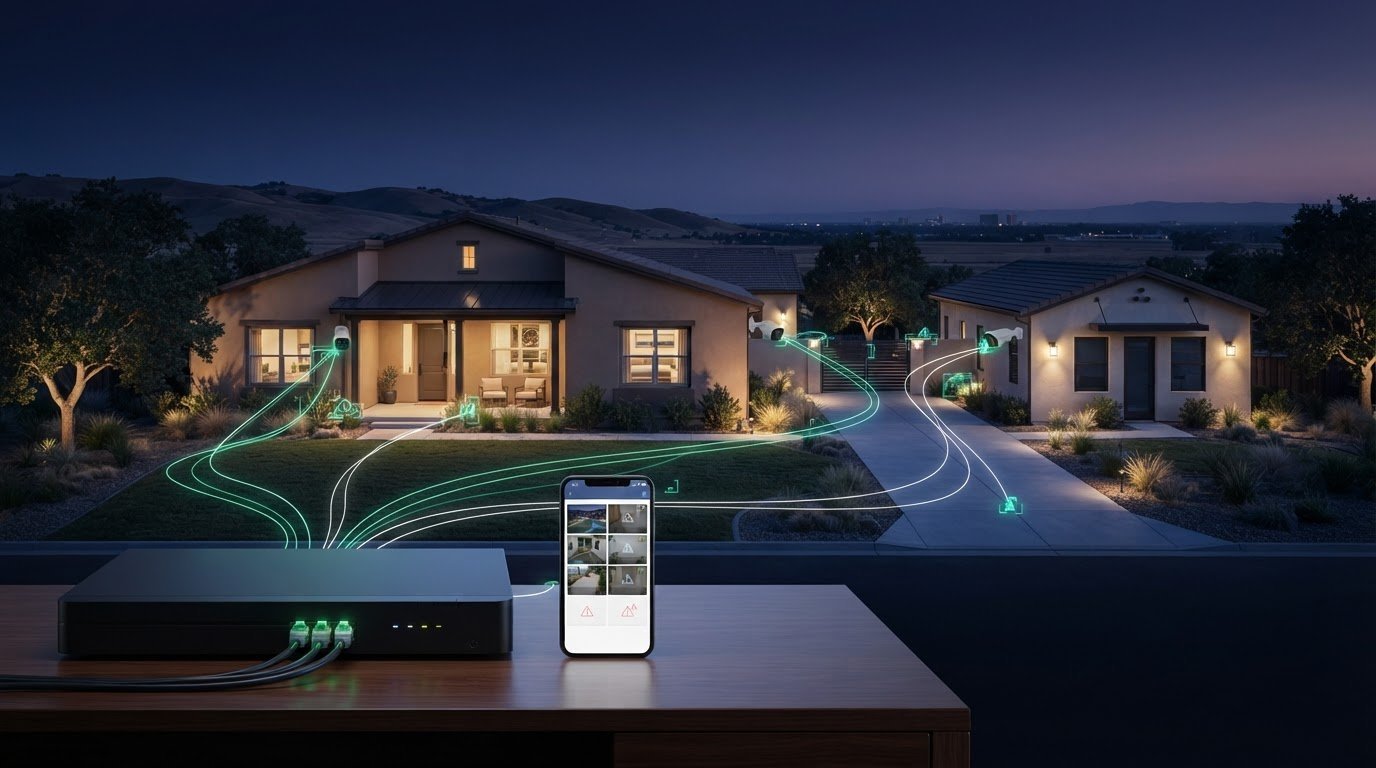
What if your cameras capture an important moment, but you can’t quickly find the footage or receive a useful alert? A security system with cctv works best when cameras, recording equipment, motion detection, and remote access are planned as one connected workflow, rather than as separate features.
To choose a setup that’s useful day to day, start with what you need to monitor, how you want recordings handled, and who should be able to access the system. Then compare camera coverage, recording, alerts, and app access against those priorities.
This guide explains how cameras, an NVR (network video recorder), AI motion detection, and remote app configuration work together. You’ll also learn what 4K PoE cameras can contribute and what to discuss when planning installation. For homes and commercial properties in Sacramento, Roseville, Rocklin, Folsom, Antelope, Elk Grove, Rancho Cordova, Natomas, and West Sacramento, StaySafe365 installs security camera systems tailored to the property and its monitoring needs.
Key Takeaways
- A security system with cctv coordinates camera coverage, recording, motion detection, and app access around your monitoring goals.
- Compare 4K resolution, AI motion detection, NVR setup, and remote app configuration by asking how each feature will be used at your property.
- List the areas you want to monitor before choosing features, then discuss camera placement and system setup with a security professional.
- Homes and commercial properties can have different coverage priorities. A tailored plan helps focus the system on the spaces that matter to you.
- StaySafe365 installs security camera systems in Sacramento, Roseville, Rocklin, Folsom, Antelope, Elk Grove, Rancho Cordova, Natomas, and West Sacramento.
What a Security System with CCTV Includes for a Sacramento Property
A security system with cctv is a coordinated set of cameras and supporting equipment used to observe and record activity around a property. A standalone camera may capture video on its own. A complete system connects cameras to recording equipment and, when configured, remote access and alert features. Each component has a role in helping you capture, find, and review footage.
CCTV, short for closed-circuit television, describes video monitoring in which cameras send footage to selected equipment or users. For a foundational overview of the technology and its components, see Closed-circuit television. In practical terms, a Sacramento homeowner might prioritize an entrance, while a business manager in Roseville may need to consider several areas across a commercial property. Start with the spaces you want to monitor, then plan the system around them.
What are the main parts of a CCTV system?
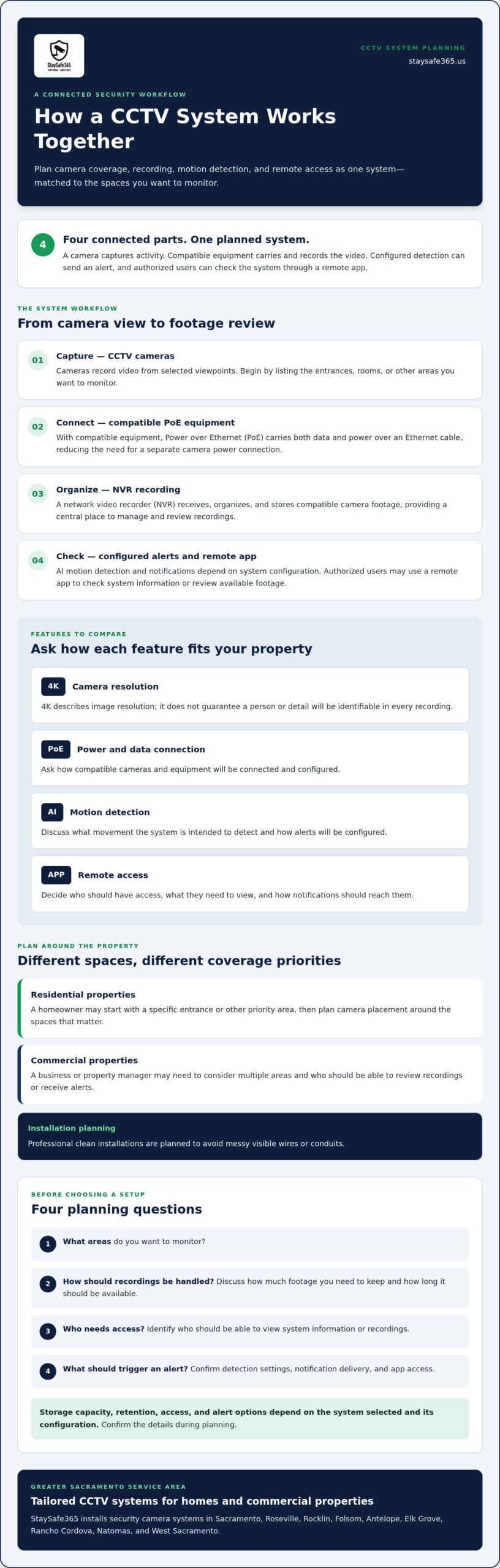
Cameras capture video from chosen viewpoints. A network connection carries that video to the recording equipment. With compatible PoE equipment, an Ethernet cable can carry both power and data to a camera, which can reduce the need for separate power connections at the camera.
An NVR, or network video recorder, receives, organizes, and stores compatible camera footage. It provides a central place to review recordings. Remote app configuration can let authorized users check system information on a mobile device. Before installation, decide who needs access and what they need to view.
How does a CCTV system turn activity into an alert?
The basic sequence is simple: a camera captures activity, the system records footage, and configured detection or alert settings may notify a user. AI motion detection is designed to identify relevant movement. During planning, ask what the system is intended to detect and how alerts will be configured for your property.
For example, a property owner in Roseville might use an app to check available camera footage remotely, while a commercial property manager in Elk Grove may want to review recorded activity after an alert. The available access and notification options depend on the system configuration.
Cameras capture activity, the recorder organizes footage, and configured alerts can prompt users to check it. Planning these elements together helps homeowners and businesses in Sacramento, Folsom, and Rocklin choose a system that fits the property rather than relying on a camera alone.
How CCTV Cameras, NVR Recording, and Remote Apps Work Together
Picture a camera covering an entrance to a Sacramento home or business. It captures activity and sends video through a compatible PoE connection to an NVR, which records and organizes the footage. If AI motion detection and notifications are configured, detected movement may prompt an alert. An authorized user can then open the remote app to check available system information or review footage, depending on the setup.
This workflow shows why a security system with cctv should be planned as a set of connected parts. Camera resolution, recording, detection settings, and app access each affect how the system serves the property. 4K describes image resolution; it doesn’t guarantee that a particular person or detail will be identifiable in every recording.
What does PoE mean in a CCTV system?
PoE means Power over Ethernet. With compatible cameras and equipment, an Ethernet cable carries both data and power, reducing the need for separate camera power connections. The system design and equipment determine how the connection is configured. For more wiring and installation considerations, consult a PoE camera installation guide and confirm the plan with your installer.
What does an NVR do with CCTV footage?
An NVR provides a central place to manage recordings from compatible cameras. Before choosing a setup, discuss how much footage you need to keep, how long you want it available, and who should be able to access it. Storage and retention depend on the system selected, so confirm those details instead of assuming a particular capacity or recording period.
An NVR brings compatible camera recordings together so users can manage and review footage in one place.
AI motion detection and notifications add another step to the workflow, but their behavior depends on configuration. Ask which kinds of movement the system is set to detect, how alerts are delivered, and how users can manage app access. These questions help a homeowner in Folsom or a commercial property manager in Elk Grove know what to expect before installation.
Camera placement and use also deserve consideration. The U.S. Department of Justice provides background on legal considerations for using CCTV in its criminal resource manual, which addresses government surveillance. Property owners should check guidance that applies to their own setting and location.
For properties in Sacramento, Roseville, Rocklin, and nearby communities, StaySafe365 can help plan camera installation around coverage, NVR setup, detection, and remote app configuration. Review the security camera installation service as you consider a solution for your home or business.
Which CCTV System Features Matter for Homes and Businesses?
The right features depend on what you want to monitor and how you’ll use the system. A homeowner in Sacramento may prioritize mobile viewing. A business owner or property manager in Roseville, Folsom, Elk Grove, or Rocklin may also need to consider who can access footage and which areas require coverage. A Closed-circuit television (CCTV) setup is most useful when its features support these practical needs, rather than adding options without a clear purpose.
| Feature | Practical purpose | Planning question |
|---|---|---|
| 4K resolution | Provides high-definition video at 4K image resolution. | Which views would benefit from this level of detail? |
| AI motion detection | Helps identify relevant movement for configured detection and alerts. | What activity should prompt a notification? |
| NVR setup | Centralizes compatible camera recordings for management and review. | How should footage be stored, accessed, and retained? |
| Remote app configuration | Lets authorized users check system information through a mobile app when configured and connected. | Who needs access, and what should they be able to view? |
Which CCTV features should homeowners consider?
Start by listing the areas you want to monitor, such as entrances or shared access points. Then consider whether remote viewing would be useful. App access can let you check system information from a mobile device, but availability depends on configuration and connectivity. Ask how the app will be set up and who will have access. For broader residential planning, look for the guide titled Sacramento home security systems.
How can businesses and property managers assess system needs?
List the areas that need oversight and identify who requires authorized access. A small business and a larger commercial property may have different coverage priorities, recording needs, and user requirements. A tailored plan can account for those differences instead of applying the same layout to every site. For business-specific planning, consult the commercial security camera installation guide.
Before installation, compare each feature with a specific monitoring goal. A professional plan can coordinate camera placement, 4K PoE cameras, NVR setup, AI motion detection, and app configuration. StaySafe365 provides tailored camera installation solutions for residential and commercial properties across the Greater Sacramento area.
How to Plan a CCTV Security System Without Overcomplicating the Choice
A clear plan starts with the property, not a list of features. Whether you’re securing a home in Sacramento or managing a business in Rocklin, use this sequence to keep decisions focused:
- Define your monitoring goals. Decide what activity you want the system to help you observe.
- Identify priority areas. Note entrances, shared access points, or other parts of the property to discuss.
- Review relevant features. Consider 4K resolution, AI motion detection, NVR recording, and remote app access in light of your needs.
- Plan the installation. Discuss camera placement, equipment setup, app access, and the appearance of the finished work.
This process helps you choose a security system with cctv that fits how you’ll use it, rather than adding features without a clear purpose. A professional site assessment can help clarify the proposed layout and identify questions to resolve before installation. The plan should connect the system design to your goals rather than assume every home or commercial property needs the same arrangement.
What should you decide before planning CCTV coverage?
Make a short list of the areas and situations you want the cameras to cover. Decide who needs remote app access and what they should be able to view. Note any questions about resolution, recording, motion detection, and installation appearance. Bringing these priorities to a discussion makes it easier to compare options and explain what matters to your household, staff, or property operations.
What should you ask during a security system consultation?
Ask how the proposed camera placement and NVR setup support your monitoring goals. Confirm how remote app configuration will be explained and how access for relevant users will be handled. Discuss the installation finish, too, including how the plan will avoid messy visible wires or conduits. Clear answers help you understand the proposed system before work begins.
For a homeowner in Folsom, the priority may be straightforward access to selected camera views. A business in Elk Grove or a managed property in Roseville may have different coverage and user-access needs. Tailored planning allows those priorities to guide camera installation while keeping resolution, recording, detection, and app access in view.
If you’re planning a residential or commercial camera installation in Sacramento, Folsom, Elk Grove, Roseville, or Rocklin, schedule an on-site consultation or request a security project quote from StaySafe365.
Explore a Professionally Installed CCTV Security System in Greater Sacramento
A well-planned security system with cctv coordinates camera coverage, recording, detection, and remote viewing around the property’s needs. A home in Folsom may have different priorities from a commercial property in Sacramento, so planning should begin with what the owner wants to monitor.
What can professional CCTV installation help coordinate?
Professional planning connects camera locations with the features selected for the property. StaySafe365 supplies and installs security camera systems for residential and commercial properties, with options that include 4K PoE cameras, NVR setup, AI motion detection, and remote app configuration. Discuss how these elements can support your monitoring goals and what authorized users will be able to view.
Installation appearance matters, too. StaySafe365 prioritizes a clean finish with no messy visible wires or conduits. Tailored residential and commercial solutions can account for different layouts and monitoring priorities without assuming one arrangement suits every property.
How can Greater Sacramento property owners take the next step?
Before discussing an installation, note the areas you want to monitor, who may need app access, and what you want to understand about recording and detection. Homeowners, business owners, and property managers can bring those priorities to a conversation about camera placement and system setup. This helps keep the proposed solution aligned with the property and its intended use.
StaySafe365 serves Sacramento and nearby communities, including Roseville, Rocklin, Folsom, Antelope, Elk Grove, Rancho Cordova, Natomas, and West Sacramento. Whether you’re planning camera installation for a home or commercial property, share your coverage goals and ask how the equipment, recording, alerts, and app access will be coordinated.
Schedule an on-site consultation or request a security project quote to discuss a CCTV camera installation plan for your Greater Sacramento property.
Plan a CCTV System That Fits Your Property
A well-designed security system with cctv brings camera coverage, recording, motion detection, and remote viewing together around your monitoring priorities. 4K resolution, PoE, AI motion detection, NVR setup, and mobile app access each serve a different purpose, so choose features according to how you’ll use the system. Homes and commercial properties may need different layouts and access arrangements.
StaySafe365 professionally installs tailored security camera systems for residential and commercial properties across Greater Sacramento, including Sacramento, Roseville, Rocklin, Folsom, Antelope, Elk Grove, Rancho Cordova, Natomas, and West Sacramento. Professional planning helps coordinate cameras, recording, and app configuration, with clean installations and no messy visible wires or conduits.
Start with a clear idea of what you want to monitor. Schedule an on-site consultation or request a security project quote to discuss a camera installation plan for your property.
Frequently Asked Questions
What is included in a security system with CCTV?
A security system with CCTV typically includes cameras, connections that carry video, and recording equipment such as an NVR. Depending on the system design, it may also include motion detection and remote app access for authorized users. Cameras capture activity, while the recorder organizes footage for review. Confirm which features and setup details fit your property’s monitoring goals before choosing a system.
How does a CCTV security system work with an NVR?
An NVR receives and organizes video from compatible cameras, creating a central place to manage recordings. Cameras capture activity and send footage over the system connection to the recorder. Users can then review available recordings through the NVR or configured access options. Ask about storage, how long footage will be kept, and who can access it, since those details depend on the system setup.
Can I view CCTV cameras remotely on my phone?
Remote viewing may be available through a mobile app when the system and app access are configured for it. Authorized users can check available camera views or system information from a phone, subject to the setup and connectivity. Before installation, discuss who needs access, what they should be able to view, and how app configuration will be explained. Remote access depends on connectivity.
What does PoE mean for CCTV cameras?
PoE means Power over Ethernet. With compatible cameras and equipment, an Ethernet connection carries both power and video data, rather than requiring a separate power connection at each camera. The equipment and system design determine how PoE is configured. Ask an installer how cabling will be planned for your property. A clean professional installation should have no messy visible wires or conduits.
Is 4K resolution important for a security camera system?
4K describes image resolution and can be useful if high-definition video matters for the views you want to monitor. It doesn’t guarantee that every detail will be identifiable in every recording. Consider camera locations and your intended use, then ask how 4K fits the complete setup, including recording and app access. StaySafe365 offers 4K PoE camera systems for residential and commercial properties.
Can AI motion detection send alerts from a CCTV system?
AI motion detection can be configured to identify relevant movement, and a system may send notifications based on its settings. The exact detection and alert behavior depends on the equipment and configuration. Confirm what activity is intended to prompt an alert and how notifications reach users. Discuss these requirements alongside camera placement and NVR setup so the planned workflow suits your property.
Should a home or business use a professionally installed CCTV system?
Professional installation can help coordinate camera placement, recording, detection, and app access around a property’s needs. A home and a commercial site may have different coverage priorities, so discuss your goals and the proposed setup with the installer. StaySafe365 installs security cameras in Sacramento, Roseville, Rocklin, Folsom, Antelope, Elk Grove, Rancho Cordova, Natomas, and West Sacramento, with clean installations and no messy visible wires or conduits.
Ready to discuss a camera installation for your home or business? Schedule an on-site consultation or request a security project quote from StaySafe365.
Leave a Reply