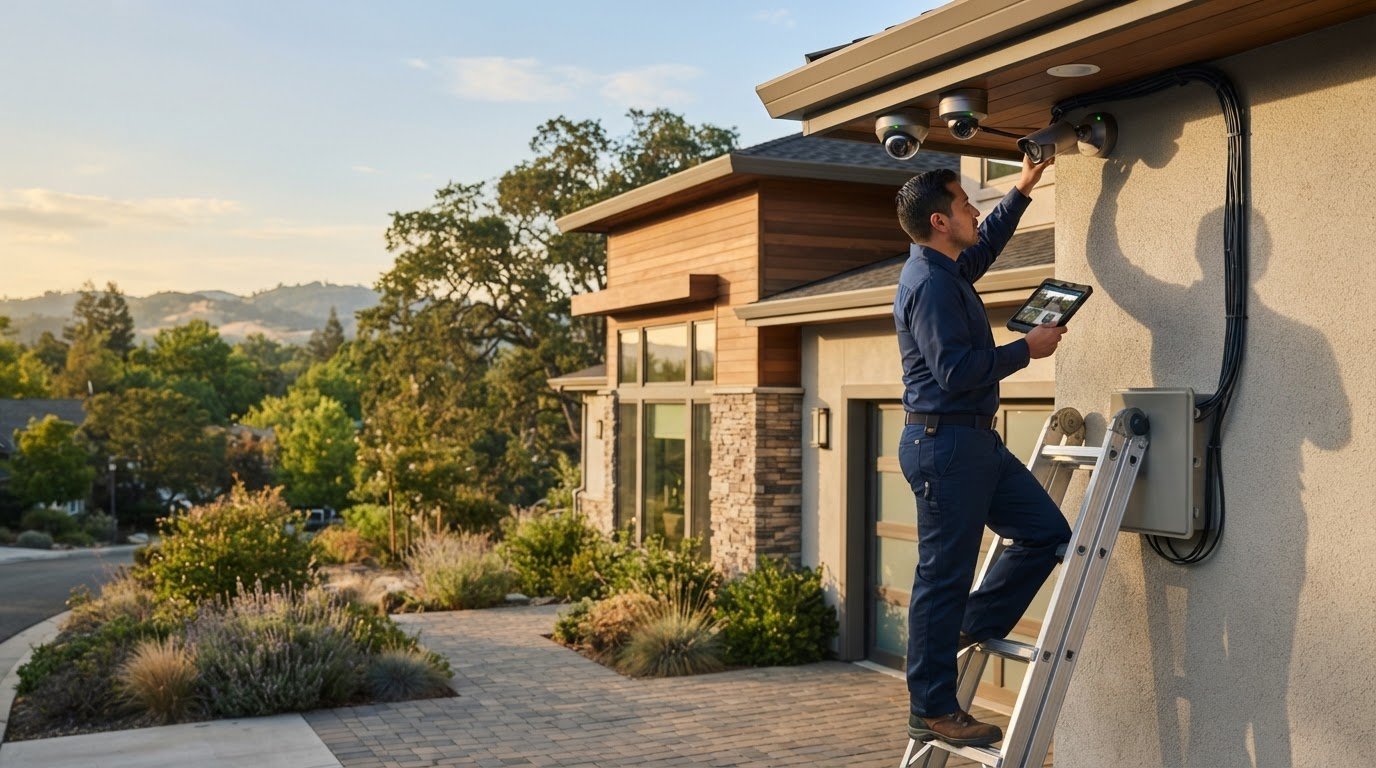
What good is a security camera if its view misses an entrance or the footage is difficult to review? With security camera installation in Roseville, CA, property owners can start by identifying the areas they need to monitor, then choose camera positions and equipment to match. A clean installation also depends on planning cable routes and mounting locations before work begins.
StaySafe365 provides security camera installation for homes and businesses in Roseville and nearby communities. Its offerings include high-definition cameras, alarm systems, and integrated smart security technology. Before choosing a setup, it helps to understand what each camera will show, how footage will be recorded, and which installation tier fits the project.
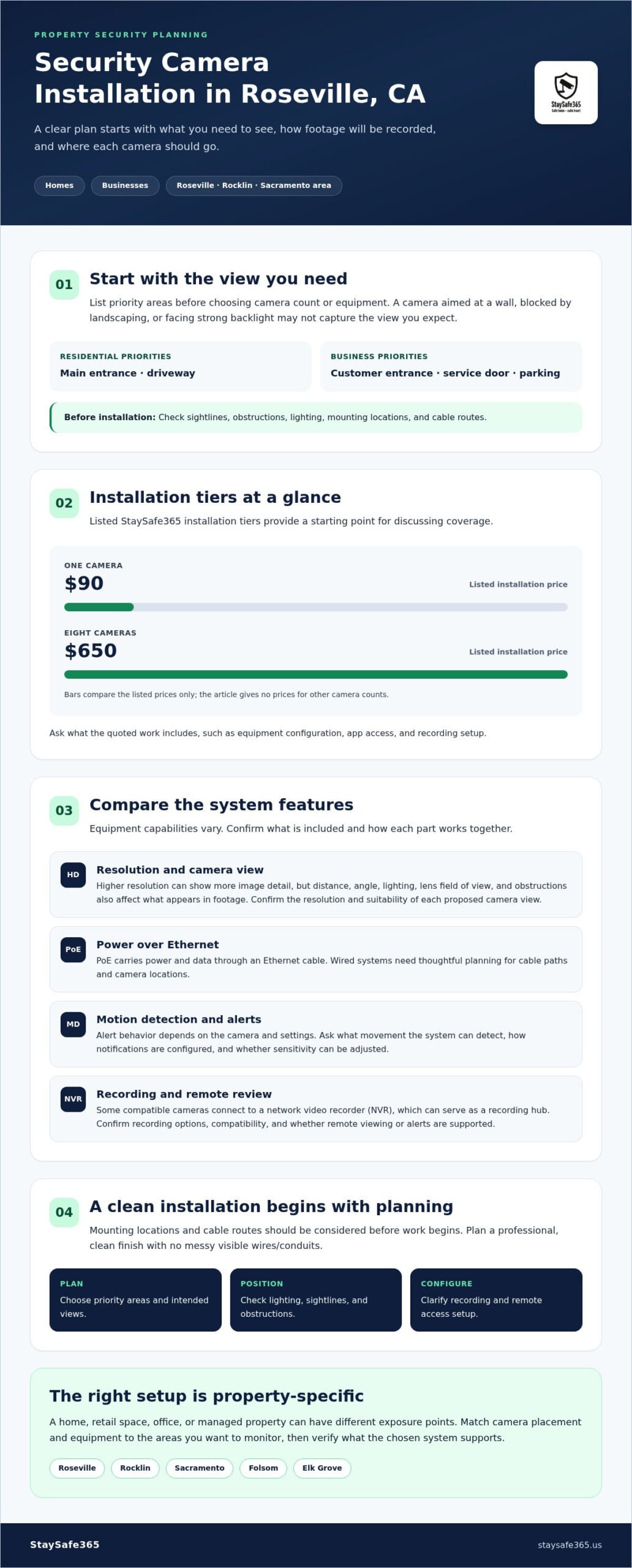
This guide covers practical questions to ask about camera placement, recording, remote access, and installation pricing. It also explains how features such as high resolution, Power over Ethernet (PoE), and motion detection may factor into a system, without assuming every product has the same capabilities. StaySafe365’s listed installation tiers run from $90 for one camera to $650 for eight cameras, giving Roseville property owners a starting point for planning.
Key Takeaways
- Plan security camera installation in Roseville, CA, around the entrances, sightlines, and activity you want to monitor.
- Compare camera resolution, power and connection options, recording methods, and remote access before choosing equipment.
- Use StaySafe365’s installation tiers, from one camera for $90 to eight cameras for $650, as a starting point for discussing coverage.
- Check for obstructions, lighting issues, and cable-routing needs when choosing camera locations.
- Ask a local installer what the quoted work includes, including equipment configuration and any app or recording setup.
Securing Your Roseville Property: The Role of Professional Surveillance
Effective surveillance starts with deciding what you need to see. A camera pointed toward a wall, blocked by landscaping, or aimed into strong backlight may not capture the view you expect. Homeowners and commercial property managers in Roseville and Rocklin can begin by listing priority areas, such as entrances, shared spaces, parking areas, or delivery points, then checking whether each location has a clear camera sightline.
A camera system may include cameras, a recording device, and a way to view footage remotely. The exact setup depends on the equipment selected. Traditional closed-circuit television records video for later review, while connected systems may also support remote viewing or alerts. Learn more about the basic concept of Closed-circuit television (CCTV). Before installation, confirm which features are included in the proposed system and how each component will work together.
Why Asset Protection in Rocklin and Roseville Matters
Homes, retail spaces, offices, and managed properties have different exposure points. A residence may need views of its main entrance and driveway. A business may prioritize customer entrances, service doors, or parking areas. A useful plan identifies the activity each camera should capture, rather than adding cameras without a clear purpose.
Remote access can be useful for owners who want to check available camera views when away from a property. Confirm whether the selected equipment supports app access, whether the system records footage, and how recordings can be reviewed. Camera monitoring does not replace emergency response, but it can help owners stay informed about activity around a property.
The Professional vs. DIY Security Gap
DIY and professionally installed systems can differ in how cameras are powered, connected, mounted, and configured. For example, some cameras use batteries, while Power over Ethernet systems use an Ethernet cable to carry power and data. Each option has trade-offs. Battery-powered equipment may need recharging, while wired systems require careful planning for cable paths and camera locations.
For security camera installation in Roseville, CA, consider more than the number of cameras. Check that the planned views cover the areas you care about, that the recording and remote viewing options meet your needs, and that the installer explains the equipment and setup. StaySafe365 installs security camera systems for homes and businesses, with installation tiers based on camera count. Ask how the installation will be configured for your Roseville home, Rocklin business, or other local property.
Advanced Features for Modern Asset Protection in Rocklin and Roseville
A camera system is most useful when its footage is clear enough for the intended purpose, recorded in a way that suits the property, and straightforward to review. For homes and businesses in Roseville and Rocklin, compare image resolution, connection type, motion alerts, recording options, and remote access. These features vary by equipment, so ask which are included before settling on a system.
High-Definition Video and Motion Detection
Higher-resolution video can capture more image detail than lower-resolution video, but resolution alone does not guarantee a useful view. Distance from the subject, camera angle, lighting, lens field of view, and obstructions all affect what appears in a recording. If you want to monitor a face-height entrance or a vehicle approach, ask whether the proposed position and camera view are appropriate for that task.
Motion detection can notify users when movement is detected, but how alerts work depends on the camera and its settings. Some equipment may offer ways to adjust detection areas or distinguish certain types of movement. Before relying on alerts, check what the system can identify, how notifications are configured, and whether sensitivity can be adjusted to reduce alerts from irrelevant movement. For more on one type of camera connection and installation, see this PoE camera installation guide.
PoE, Recording, and Remote Monitoring
Power over Ethernet, or PoE, carries power and data through an Ethernet cable. Some systems connect compatible cameras to a network video recorder (NVR), which can serve as a recording hub. Compatibility, recording capacity, and access methods depend on the equipment. Ask whether a proposed system uses an NVR, where footage is stored, and how long it can be retained under the selected settings.
Remote access may let users view available camera footage from a phone or another connected device. If app access matters to you, confirm whether the equipment supports it and ask what setup is required. Property owners in Roseville, Rocklin, Folsom, or Sacramento should also check how live views, recordings, and alerts can be accessed by the people who need them.
When considering security camera installation in Roseville, CA, ask how the cameras, recording equipment, and any app access will work together. StaySafe365 offers high-definition cameras and integrated smart security technology, alongside professional installation. Explore the local camera installation service to discuss an installation for your property.
Comparing Security Camera Installation Tiers and Coverage
Choose a camera count based on the areas you want to monitor, not just the size of the property. A Roseville condo may need views of an entrance and another priority area. A business in Rocklin may need coverage for several doors or work areas. StaySafe365’s flat-rate installation tiers provide a starting point for comparing the number of cameras with your planned coverage.
Finding the Right Package for Your Home or Business
Make a list of priority locations, then consider whether each needs a separate view. Check for walls, landscaping, lighting, and other conditions that could affect what a camera captures. The right layout depends on the property, and camera count alone does not guarantee complete coverage.
- 1 camera: $90. A starting point for one priority location, such as an entrance.
- 2 cameras: $150. An option to consider when two distinct views are needed, such as an entrance and driveway.
- 4 cameras: $350. A possible fit for monitoring several areas of a home or small business, depending on the layout.
- 6 cameras: $550. Consider this tier when a property has several entrances or separate areas to monitor.
- 8 cameras: $650. This tier may suit a larger home or commercial property with multiple priority locations.
Before booking, ask what the installation covers for your project. Clarify whether the quote includes camera mounting, cable routing, equipment setup, and configuration of any recording or remote-viewing features. The details of the equipment and setup should be confirmed for the specific project.
The Value of Flat-Rate Professional Pricing
Published installation tiers make it easier to compare the listed price by camera count. They are a useful starting point, but confirm what applies to your project before proceeding. Ask which equipment is included, whether any system configuration is part of the installation, and whether there are project-specific requirements that could affect the scope. Read the provider’s written quote and terms rather than assuming that equipment, recording, or app access is included.
For a broader overview of property protection options in the region, read the home security systems Sacramento guide. If you’re comparing security camera installation in Roseville, CA, use the listed tiers as a planning reference, then match the installation scope to your home or business needs.
Strategic Camera Placement for Maximum Property Security
Good camera placement starts with what you need to see, then accounts for approach paths, obstructions, lighting, and the view each camera can capture. In Roseville and Rocklin, a home’s entry doors, garage, and side yard may call for different angles. A commercial site may prioritize customer entrances, delivery areas, or work zones. Sketching these locations before installation can help identify gaps and prevent unnecessary overlap.
Residential Placement: Front Doors to Perimeter Fences
For a Roseville home, consider the front door, garage entry, side yard, and other accessible approaches. A camera positioned to capture the doorway may show activity near the entrance, while a different angle may provide a wider overview. The right position depends on the camera’s field of view and the details you want to capture. Explore this home security camera installers guide for more placement context.
Commercial Placement: Loading Docks and Retail Floors
Rocklin and Roseville businesses can plan camera views around how people and goods move through the site. A camera aimed at a loading area may help record delivery activity, while views of retail entrances or other high-traffic areas can support later review. If considering coverage near cash-handling locations, account for privacy and the camera’s intended purpose. For broader business-focused guidance, see commercial security camera installation in Sacramento.
Reduce Blind Spots with Deliberate Angles
A wide-angle lens may show more of a scene, while higher resolution may preserve more image detail. Neither feature guarantees that every corner or subject will be visible. Walls, eaves, trees, glare, and overlapping views can all affect coverage. Review each planned camera view and aim it at a specific area, such as a walkway or doorway, rather than expecting one camera to cover an entire property.
Balance Visibility, Coverage, and Clean Installation
Visible cameras may signal that a property is monitored, while a less prominent position may better suit the building. Choose locations that provide a useful view and are not easy to reach, while also considering maintenance and cable routing. Ask the installer how cables will be routed and what parts of the installation may remain visible. The answer depends on the property’s construction and the selected equipment.
For security camera installation in Roseville, CA planned around your property’s entrances and sightlines, request a camera installation quote.
StaySafe365: Your Local Expert for Professional Security Installation
A well-planned camera system should fit the property, provide useful views of important areas, and be straightforward to use. StaySafe365 provides professional security camera installation in Roseville, Rocklin, and the Greater Sacramento area. Its offerings include high-definition cameras, alarm systems, and integrated smart security technology for homes and businesses.
Installation planning should account for camera locations, cable paths, and how the equipment will be configured. Before work begins, discuss the areas you want to monitor and ask what the installation includes. Property owners can also compare StaySafe365’s camera installation tiers, from $90 for one camera to $650 for eight cameras, when considering the project scope.
Serving Roseville, Rocklin, and the Greater Sacramento Area
Local properties have different layouts and priorities. A Roseville home may need a view of its front door and garage, while a Rocklin business may prioritize customer entrances or delivery areas. The installation plan should reflect those priorities rather than rely on a one-size-fits-all camera layout.
StaySafe365 serves Sacramento, Roseville, Rocklin, Folsom, Antelope, Elk Grove, Rancho Cordova, Natomas, and West Sacramento. When discussing a project, identify priority areas and ask about suitable camera positions, cable routing, and the setup of any recording or smart security features included in the system.
Request a Security Project Quote
Before requesting a quote, prepare a short list of the areas you want to monitor, such as an entry door, driveway, side yard, storefront, or delivery area. Note any obstructions or lighting conditions that could affect the view. You can also ask how the proposed cameras and recording equipment will work together, and whether remote access is available with the selected system.
StaySafe365 provides security camera installation with camera-count pricing tiers. To understand which option fits your home or business, share your priority locations and ask what the installation includes. A clear scope makes it easier to compare the proposed setup with your coverage needs.
Protect Your Property with a Clear, Local Plan
Strong surveillance starts with thoughtful camera placement and equipment that suits the property. Consider image detail, recording options, connection type, and how footage can be reviewed. Just as important, confirm how the installation will handle camera mounting and cable routes before work begins.
StaySafe365 provides security camera installation in Roseville, CA, and nearby communities, with listed installation tiers starting at $90. Homeowners and businesses in Sacramento, Roseville, Rocklin, Folsom, Antelope, Elk Grove, Rancho Cordova, Natomas, and West Sacramento can discuss their camera placement priorities and installation options.
Ready to plan camera coverage for your property? Request a security camera installation quote from StaySafe365.
Frequently Asked Questions
How much does security camera installation cost in Roseville, CA?
StaySafe365’s listed camera installation tiers range from $90 for one camera to $650 for eight cameras. Other options are $150 for two cameras, $350 for four, and $550 for six. These prices provide a starting point for Roseville homeowners and businesses. Request a quote to confirm which tier fits your project and what the installation includes.
Can an installer route camera cables neatly?
Cable routing depends on the building, the chosen camera locations, and the equipment. Before installation, point out where you want cameras and ask how cables will be routed and which sections may be visible. If you are considering PoE cameras, remember that the Ethernet cable carries both power and data, so its route is part of the installation plan.
What is the difference between PoE and wireless security cameras?
PoE cameras use an Ethernet cable to carry power and data. Wireless cameras send data without a direct camera-to-recorder cable, although their power method depends on the equipment. A wired connection may suit a property where cable routing is practical, while other setups may fit different layouts. For a Roseville, Sacramento, or Folsom property, discuss the building and preferred installation style before choosing equipment.
Can I monitor my security cameras from my phone?
Remote viewing depends on the camera system and its configuration. Ask whether the selected equipment supports mobile app access, whether it can show live or recorded footage, and what setup is required. This is a useful question for property owners in Rocklin, Elk Grove, and other Greater Sacramento communities who want to check camera views while away.
How many cameras do I need to protect my Roseville home?
The right number depends on your home’s layout and the areas you want to monitor. Start by listing priority locations, such as the front entry, garage, side yard, or another access point. Then consider whether each needs a separate view and check for obstructions. StaySafe365 offers installation tiers for one, two, four, six, or eight cameras. A property-specific discussion can help you choose a starting point.
Do you provide security camera installation for businesses in Rocklin?
StaySafe365 provides security camera installation for businesses in Rocklin and the Greater Sacramento area. Camera placement can be planned around the property’s layout and priorities, such as entrances, customer areas, or delivery locations. Installation options range from one to eight cameras. Business owners in Roseville, Rancho Cordova, Natomas, and West Sacramento can request a quote for their site.
What happens during an on-site security consultation?
Before arranging a site visit, ask the installer what the consultation process involves and what information will be included in a quote. Be ready to explain what you want to monitor, point out possible camera locations, and discuss the installation tiers. This helps homeowners and property managers in Antelope or Elk Grove prepare questions and understand the proposed scope.
Is 4K resolution necessary for home security cameras?
Not every home needs a 4K camera. Higher resolution can provide more image detail, but the result also depends on camera placement, distance, lighting, and the scene. Consider what you need to see at each location and ask which resolution is available with the proposed equipment. Roseville homeowners can weigh image detail alongside their coverage priorities.
Ready to discuss camera coverage for your home or business? Request a security project quote from StaySafe365.
Leave a Reply